Category Archives: 07d-Delivering a presentation

Developing high-quality “stand, speak, explain and/or sell” skills, clearly communicating to a group using a PowerPoint presentation, adroitly handling Q&A, projecting confidence and competence

How the Nixon-Kennedy Debate Changed the World

“It is not simply what we say, but how we say it, and how we look while saying it.”
360_presidential_debate_0924

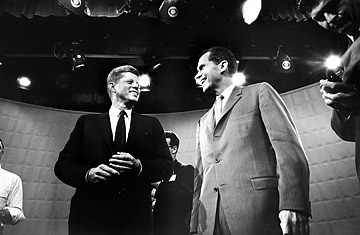
Jack Kennedy, left, and Dick Nixon before their 1st TV debate.

Today, I attended a training course on communicating assertively. It was filled with a lot of great takeaways, and the focus was around adapting your approach towards others for optimum results. The instructor brought up the three “V’s” when communicating with others: verbal, vocal, and visual. It is primarily the vocal (tone) and visual (appearance, facial expressions, body language) that impact communication. Together, these two V’s count for 93% of the impact. Of course, this is context dependent, but the statement led one of my colleagues to mention the famous Kennedy vs. Nixon debate.

In case you are unaware, this was the first presidential debate ever broadcasted on TV. The debate of course was also broadcasted on the radio, and for those listeners who were polled, more said that Nixon was the winner than Kennedy. For those who were lucky enough to watch the debate on TV, more said that Kennedy was the winner. The conclusion—Kennedy’s visual appearance and presence was superior to Nixon’s, and this made him the clear winner, at least to those who watched it on TV.

I was not around for this debate and have not had a chance to watch it yet, but from what I have read, some words used to describe Kennedy after the debate were handsome, dapper, calm, confident, and poised, while Nixon was described as sickly, clammy-faced, awkward, and sweaty. We all know that Kennedy went on to win the presidency, and many believe that this televised debate was what took him from a young, relatively unknown senator to a star in one night.

After hearing this story, I searched for some articles about this debate to investigate. Some argue that the polls used were not statistically significant, and I will leave that up to you to decide. In the end, I do believe that when it comes to communicating and presenting, tone and body language influence the verbal message. It is not simply what we say, but how we say it, and how we look while saying it. We all need to take this into consideration when presenting for impact.

Interesting Time Article on the debate and its impact on the world.

SCHUTZER, PAUL. Democratic and Republican presidential candidates Jack Kennedy, left, and Dick Nixon stand underneath glaring lights prior to beginning their 1st TV debate. Digital image. How the Nixon-Kennedy Debate Changed the World. Time, 23 Sept. 2010. Web. 14 Aug. 2014.
Spontaneous Production

Mark Twain once said “It usually takes me three weeks to prepare a good spontaneous performance.” Twain was also known for writing out his speeches verbatim and keeping it hidden under a stack of papers while he presented at the podium.  Unfortunately preparation is not always a luxury. From dreaded cold calls in class, to receiving an accolade only for it to be followed with “speech, speech, speech!” or being blind-sided in a meeting; forced into a production, there are times where one has to spring into action at a moment’s notice. Often times these interactions can be more frequent than and just as important as a formal presentation. You never know when you may have a chance to make a good impression, so being able to think on your feet is a great skill to have.

There are a few recommendations I would like to highlight, some form an article from MindTools:  http://www.mindtools.com/pages/article/ThinkingonYourFeet.htm as well as some of my own.


  1. Relax – If you have a poker face, now is the time to use it. Most people can spot the deer in headlights look fairly easily. Take a moment, ask yourself exactly what is expected of you at this instance, whether it be a spontaneous speech, an off-the-wall interview question, etc. and start coming up with a plan.


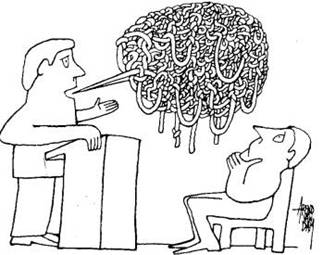
  1. Take your time– It is okay to repeat the question to ensure you completely understand. It is also permissible to buy a little time to construct a plan in your head. Most expect a little thought to go into a spontaneous production. As bad as awkward silence can be, rushing into a performance with little to no plan can lead to a garbled, confusing storyline that neither the audience nor the presenter can follow.

garbledspeech

  1. Stick to one main point or theme, and support it – Much like jumping right in without a plan, trying to hit on too many points at once can lose the audience quickly. There will likely be time for follow-up to tackle remaining details, so ensure the main point is communicated clearly and adequately supported.


  1. Be confident – Confidence does not happen by chance. It takes time to build up confidence in one’s delivery. Formal presentations, controlled environments like Toastmasters, and other forums that allow you to work on delivery, as well as formulate opinions and articulate them clearly and quickly will be the difference in experiencing dread or experiencing a feeling of opportunity the next time you are called upon suddenly.

Master Presenter

Since having reviewed my own end of the semester presentation and since having to think critically about how I can be a better presenter, I turned to an article in the Harvard Business review for assistance and found that it summarizes the MP process perfectly.  In the article, “How to Give a Killer Presentation” the author, Chris Anderson, outlines five measures that will accomplish creating a great presentation; he suggests speakers should frame their story, plan their delivery, develop their stage presence, design their medium, and play to their strengths.  All of which sounds familiar and commonsensical but when dissected it resonates intensely.  The article clarifies:

Frame your story (Figure out where to start and end)

o    All people are wired to tell and listen to stories so telling a story will best engage an audience.

o    Determine what the audience already knows and don’t waste time restating information that will prove to bore your audience.

o    Quickly introduce why you care/interested and don’t waste time trying to convince your audience to care/interested.

Plan your delivery (Decide to memorize, rehearse, or simply converse)

o    Use presentation to map out the direction of the presentation but do not use as talking points.

o    Memorizing scripted presentations are best but ONLY when antiquate preparation has been given.

o    A conversational tone works best over passionate or authoritative tones.

Develop your stage presence (No matter how well you deliver a presentation content is always more important)

o    Keeping your lower body still is the most successful way to appear more commanding.

o    Eye contact is the most important physical hallmark of a good presenter.

o    Introduce yourself to as many of the audience members before your presentation because doing so will ease your nerves, make you present, and lifts the veil of a unfamiliar audience.

Design your medium (Enhance your presentation and not distract)

o    In order to avoid being repetitive and to be found interesting by the audience do not read out bullet points on your slides.

o    Stop relying on Power Point as your only medium when so many new relevant options are at your disposal.

o    Enlist the help of an artist, ARCHITECT, photographer, or graphic designer to help develop visual communications.

Play to your strengths (Be authentic)

o    Prepare presentations well in advance to allow for proper rehearsal time.

o    Be choosey about who you select to rehearse in front of because not all criticism should be considered or is valuable.

o    Substance over style.  It is fairly easy to coach out problems with delivery but almost impossible to coach in substance to a subject or story.

Concurrently, the author points out that it may be hard to give a good presentation but it is easy to ruin a good presentation and warns us from doing these 10 things:

  1. Make a really long introduction
  2. Speak too slowly and dramatically
  3. Inform the audience how important you are
  4. Refer to your note cards or TV monitor too often
  5. Cram your slides with numerous fonts, bullet points, or illustrations
  6. Use technical jargon to impress the audience
  7. Speak at length about you and your organization
  8. Remain unaware of how much time you have or used
  9. Don’t bother rehearsing
  10. Don’t make eye contact with anyone and just look at the tops of their heads

Finally, to further summarize, let go of being perfect and really know your material well.   This allows you to conduct a conversational dialog by being present with the audience and to evolve your presentation in real time by reacting to the audience’s response.


Anderson, Chris. “How to Give a Killer Presentation.” Harvard Business Review: Magazine June 2013: n. pag. Print.

Score your Presentations

I recently came across an article which was published on Forbes on  how keeping a score  of  your presentations   and rating your presentations and I did some research on a company which tracks constantly  presentation score  ranging  from 1-5 of its business executives. It was an idea which was  conceived by  George Chambers  the CEO of Cisco who scores 4.5 on a scale of 1-5.Cisco is the worldwide leader in IT that helps companies seize the opportunities of tomorrow by proving that amazing things can happen when you connect the previously unconnected. Many companies tried to be customer friendly or customer oriented but CISCO continues to win many laurels and awards  compared to its peers because its obsession Presentation Skills.

When a Cisco executive delivers an internal presentation at company events and meetings or delivers a customer facing presentation, that executive is rated on his or her communication skills as soon as the presentation is over. Employees or customers are asked to give the executive a score ranging from 1 to 5 on the following:

1.  DELIVERY:  The presentation was delivered clearly

2.  CONTENT:  I understand how this solution/topic can be applied

First, the results offer an executive feedback on how effectively they’re delivering the Cisco story and, second, senior executives review the scores to evaluate a person’s leadership potential. According to Ricci, “The data and metrics motivate people to get better, even a little competitive with each other.

Cisco’s obsession with Presentation Skills

Presentation Tips From One Of The Masters: Steve Jobs

I used to love watching Steve Jobs unveil the new Apple products every year. I usually volunteered to cover the story at work, just so I could watch the announcement! He was always so passionate about what he did — and it certainly showed. I hope I can develop my presenting skills enough to convey the same excitement and conviction he did. I thought this article from Forbes was a great summary of his techniques he used: http://www.forbes.com/sites/carminegallo/2012/10/04/11-presentation-lessons-you-can-still-learn-from-steve-jobs/

One thing he always did so well was tell stories. He didn’t just explain why the iPod or iPhone was great; he wove a tale to make you understand why it was so great and want to buy it! You really felt like he was inspired by the product, and that you should be too.

He was also a master at keeping it simple. Jobs always managed to describe these complicated devices with simple, beautiful language that didn’t talk down to the audience. His slides were simple too: never cluttered with too many words or graphics. He let the images speak for themselves.

I also liked the way he stayed focused on his message. He never highlighted more than 3 things at a time. The human brain is only trained to process so much at once, so this enabled viewers to comprehend what he was saying in small, easily remembered parts.

If you have time, watch the video on the website of Jobs’ 2007 Apple talk. It’s worth it!

Tricks to Giving Phone Presentations

conference-phone

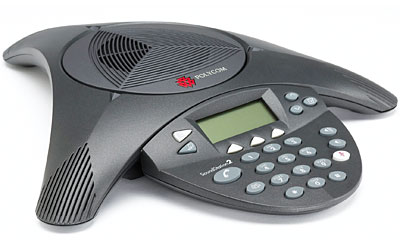
Being a great presenter is a great skill to have in front of a live audience.  However, the reality of large national and international corporations is that creating a live in-person audience is often impractical and costly. Technology has been making speaking to a physically absent audience more realistic with teleconferencing, video conferencing, and the like. However, an effective presenter also needs to have a great presence over the phone and through video conferencing equipment. The skill set is obviously similar, but here are some tips for nailing that presentation on your next conference call or video conference (which I have filtered and summarized below).

  • Check in to solicit comments or verbal acknowledgement that the audience is still with you. You may have lost the audience 10 minutes ago, and you don’t even know it.
  • Master the silence. Silence can be okay as long as it is not too long. Over the phone, it can still be used for dramatic effect.
  • Go around the horn to check in on different audience members to see that they are still following along. For instance, call someone out who you know should be listening, i.e. “Are there any questions from the Atlanta office?”
  • Don’t over answer questions. It is possible that a large portion of the audience already knows the answer and has decided to tune you out because you spent 5 minutes answering the question from the new guy who needs individual attention later.
  • Send out visuals beforehand. The addendum to the call should be sent in advance of the call to all attendees. Don’t forget page numbers and reference them in your call so the audience knows where you are.
  • Don’t read off the slides. Unlike a live presentation, the audience already has your slide deck and has probably looked ahead because you were supposed to send them the slides and exhibits before the call. Add color. Make it lively. Add value to the listeners. Keep the audience awake with a funny anecdote or an example that they couldn’t find using Google.
  • Remember to practice. Depending on the format, you may be tempted to write down what you are going to say and read it on the call. The audience can tell when something is scripted. Instead of sounding polished, you sound like an actor reading over his lines in a read-through. This is not a dress rehearsal – this is the real thing!

BIG cell phone

Inspiration:

http://blog.teamthinklabs.com/index.php/2011/12/21/7-tips-for-presenting-over-the-phone/

http://www.threetraining.com/three-tricks-to-powerful-phone-presenting/

http://brainzooming.com/7-tips-to-improve-conference-call-presentations/952/

Alternatives to PowerPoint

PowerPoint Alternatives: Will PowerPoint Ever be Obsolete?

Will PowerPoint ever be replaced?  It has become commonly accepted in the business world that ‘PowerPoint’ is synonymous with ‘Presentation’. However, when is the last time that you (or me, or anyone for that matter) questioned the validity of that accepted standard, or even gave fleeting consideration to using a different presentation platform or software program?

So, that leads to the question of whether or not PowerPoint will ever become obsolete, outdated, or replaced by something newer and shinier. In researching thoughts on this topic by folks smarter than myself (such as Jeff Bezos, CEO of Amazon, in this article), I discovered a few things.

First of all, there are already many of alternatives to PowerPoint, and while they might not be household names, they can arguably match the functionality of PowerPoint, and perhaps even be more targeted towards your audience depending on the nature of the presentation. Some of the more popular alternatives to PowerPoint include Apple’s Keynote (which Steve Jobs popularized by using when rolling out new products), Google docs (free, ‘quick and dirty”), SlideRocket (great for folks in a sales environment), and perhaps most notably, Prezi (Intuitive, sophisticated, puts ‘slides in motion’, great for storytelling).

I am personally considering giving Prezi a try based on the positive reviews and feedback that I have read and would love to hear from anyone in our class who has tried the software first-hand. It does seem that one day PowerPoint might be replaced as the gold standard for delivering presentations, but that day is likely not going to come anytime soon, and we are likely better off improving our delivery method rather than changing the platform all-together.

So, what are your thoughts??


Articles for Reference:

http://www.forbes.com/sites/carminegallo/2012/09/07/jeff-bezos-and-the-end-of-powerpoint-as-we-know-it/

http://lifehacker.com/5888189/five-best-powerpoint-alternatives

http://www.customshow.com/best-powerpoint-alternatives-presentation-programs/

http://www.powtoon.com/blog/10-best-powerpoint-alternatives/


Art of Persuasion: Tell a story

Persuasion: /pər-ˈswā-zhən/ The act of causing people to do or believe something.

Persuasion is the centerpiece of any  business activity. Customers must be convinced to buy your company’s products or services, employees and colleagues to go along with a new strategic plan or reorganization, investors to buy (or not to sell) your stock, and partners to sign the next deal.  Persuasion, despite being so critically important, history has shown that  many leaders, business executives  struggle to communicate , too often, the message  gets lost in the accoutrements of companyspeak: PowerPoint slides, dry memos, and hyperbolic missives from the corporate communications department.

Robert McKee , leading screenwriting instructor in his recent article on Harvard business review  suggests that   speakers can engage listeners on a whole new level if they toss their PowerPoint slides and learn to tell good stories instead. According to Mckee, there are two ways to persuade people. First, Using conventional Rhetoric  and second, through Uniting an Idea with emotion.Out of two the latter being the most powerful, and is best accomplished by telling a story.

Storytelling That Moves People


Takeaways from being an MP judge

Last night, I volunteered to judge the Delta presentations of the 2015 one-year MBA students. It felt good not being the presenter and  really good being the judge 🙂 Below are some key takeaways of mine.

Need for Visuals : I’m completely convinced of the need for more visuals and less text. It was very difficult to take in anything when the presentations are loaded with text. Some of the one’s were really really text heavy and it wasn’t easy to concentrate.  So you may ask, how much text is appropriate ? I felt one to two sentences per slide mixed with visuals to be more appealing.  Anything beyond that, I had difficulty moving back and forth between the screen and the presenter.

Need for Simplicity : Teams with simplicity in their slide-crafting kept me more engaged and more interested. Slides with just one data image helped me absorb the content. Whenever there was too much data on one slide, I checked out of the presentation for few minutes.  The problem with that is, even if the listener wants to check-in again it won’t be easy for him to follow. This is my take on the need for simplicity. This is an essential ingredient if you want your audience engaged totally.

Need for laughter : It’s very easy to get bored when you are just watching presentation after presentation.  If you know you will be in situations like that, it helps to have a slide that can make the audience laugh so that they can get back into the presentation

Need for honesty : When someone asks you a question at the end, it’s ok to say “yeah, we didn’t consider that issue”  instead of saying something to cover up. This helps building trust which, I believe, is the foundation for any business relationship

It was a great learning experience to be on the other side. My long trip from John Creek was well worth it. Thank You, Prof. Noonan for giving us this opportunity