Penelope Trunk is one of my favorite career advice bloggers. In one of her older posts, she provides advice on how to get your company to listen to your ideas. While the underlying principles are pretty basic, I find them very valuable and applicable to presenting a recommendation and gaining buy-in at most companies today.
I think often, it’s easy to have an idea that you think is great, and you expect upper management to agree and implement it. In reality, it’s so much more beneficial if you sell your idea in a way that makes it a no-brainer for the decision makers. What’s important to them, and what will their concerns be? If you craft your story in a manner that answers all of those hesitations upfront and also sells your idea, you’ll have better success than expecting them to know the answers.
Penelope provides three tips for selling your idea in, which I think are very useful in crafting any presentation. Know your audience and think about it from their perspective before you try to sell it in.
This is, after all, a presentation, not a recital. Every presentation needs two major components — life and energy. Recite from memory and your presentation will be sadly lacking both of these factors. Not only will you lose your audience, but you will be hard pressed to adapt to unexpected events that may throw you off your mental script.
12. Have a Backup Plan:
What if your projector dies? Or the computer crashes? Or the CD drive doesn’t work? Or your CD gets stepped on? For the first two, you may have no choice but to go with an AV free presentation, so have a printed copy of your notes with you. For the last two, carry a backup of your presentation on a USB flash drive or email yourself a copy, or better yet, do both.
5. Know the Room:
Be familiar with the place in which you will speak. Arrive ahead of time, walk around the speaking area, and sit in the seats. Seeing the setup from your audience’s perspective will help you decide where to stand, what direction to face, and how loudly you will need to speak.
6. Know the Equipment:
If you are using a microphone, make sure it works. The same goes for the projector. If it’s your projector, carry a spare bulb. Also, check to see if the projector is bright enough to overpower the room’s lighting. If not, find out how to dim the lights.
________________________________________
The four tips above are excerpts from an article by Wendy Russell titled “12 Tips for Delivering a Knockout Business Presentation”. These four tips are among the most important in my opinion. #4 and #12 go together in the sense that you need to be prepared for the unexpected. If you memorize exactly what you are going to say, then you will be in trouble if anything unexpected occurs. Rather, if you prepare to share certain content (instead of memorizing specific sentences) you will be able to speak more confidently and clearly.
#5 and #6 pertain to each other as well and can be summarized as such: know your surroundings. Your presentation should be catered to your audience instead of a cookie cutter generic presentation. Additionally, knowing the equipment you will use allows you to be even more comfortable and adaptable incase anything unexpected happens.
For those of you (like me) who are not designers or naturally gifted in graphic design, this post is for you. We are always being judged by the visual appearance of our presentations, so I think that it is worth improving our capabilities in slide design. I have gathered ten tips that are easy to implement. A link to the article can be found here, which includes a lot of useful illustrations to help get these points across.
#1 Avoid built-in themes
Custom built slides make for a more powerful statement. Templates should only be used for last minute presentations.
#2 Use quality photos
A good photo is one of the easiest ways to make your presentation look better. However, no photo is better than a bad photo. Photos should be unique, attractive, and cliché-free. Where to get free photos? Try Stock XCHING or Flickr. On Flickr, search for “creative commons licensed content,” as those photos are free and usually only require attribution.
#3 Solid colors rock
Yes, it is possible to create an impactful slide with plain design and solid colors. Choose wisely though—too bright or colorful can be bothersome to the eyes. Remember your color wheel from elementary school and use contrast when picking your secondary color.
#4 Select fonts prudently
Make sure you understand the message you want to communicate before selecting a font. The classic, old-style serif fonts are formal while sans-serif are more modern.
Note: People often think the classics are too boring. They are wrong. These are safe choices.
#5 Make your slides readable
Do not use that amazing photograph as a background if you cannot make your font readable over it. You can get around this by using a simple color bar (example below).
#6 Simpler is better
The main content comes from you when presenting, so the slides need to serve as a simplified visual aid. Think of your slides as an outline for your presentation. Additionally, simple slides prevent you from reading them.
#7 Go easy on the bullets
Keep them few in number and simple. Also, they do not need to be self-explanatory because that is what you are there for!
#8 Create clear focal points
Tip #8 may be harder to implement for those with limited design abilities (like me), but the idea is to know where and how to direct your audience’s attention You can do this with color, fonts, text size, and photographs. Without clear focal points, you risk losing your audience.
#9 Design a captivating slide cover
This slide sets the tone for your presentation, so do not ignore it even though it may only be seen for a few seconds. Leaving it up during your introductions helps start the presentation on a positive note and introduces your visual theme.
#10 Add some humor
Your goal is not necessarily to hear laughter. Consider inserting a simple comic or picture that will make your audience smile, as this will help ease any tension in the room. Remember, do not try too hard.
I know that we have some really good slide designers in the program because I have seen some beautiful slides. Anyone have other graphic design tips that the average PowerPoint user can start implementing?
The most common presentation software, Microsoft Powerpoint, has remained largely unchanged for the past two decades, and has several well-known drawbacks that impede the ability of presenters to tell their story to the audience. Fortunately, a new generation of presentation software has recently been developed. Below I’ve highlighted a several innovative presentation tools designed to promote dialogue, introduce real-time data into presentations, and foster collaboration between people creating presentations.
Presentation Structure
Powerpoint forces the presenter to present to the audience in a linear format. The problem with a linear format is that many concepts require multiple dimensions to display the interconnected nature of the subject matter. Enter Prezi, a new presentation software to create a ‘spacial narrative’ that not only allows for a 2 or 3 dimensional presentation flow and visualization, but also allows the presenter to stop at any point, and ‘zoom’ to any portion of the overall presentation. Prezi is especially great for more interactive, discussion based meetings, or for subject matter that does not have a distinctly linear format. Links to some great ‘sample’ Prezi presentations are provided below.
Real Time Data
A blog article from the Harvard Business Review website called “Presentation Tools That Go Beyond ‘Next Slide Please'” by Nolan Browne notes that ‘presentation tools have largely been static, creating an artificial boundary between the presentation and the outside world.” Power point slides are great for capturing the state of things at a particular moment in time, similar to how a balance sheet captures the financial situation of a company at the end of a quarter. For presentations that touch on subject matter that is constantly changing, this can cause a lot of extra work in changing the content, or require that the presenter present out of date information. Several new tools are working to help bring real-time data into presentations. Zoho Show, a component of Zoho Docs, an online suite of productivity tools similar to Microsoft Office, allows users to insert live media and data from a variety of online sources directly into a presentation.
Collaboration
Powerpoint impedes collaboration in several ways. First, its difficult to collaborate with others when creating a new presentation. Presenters either have to create slides separately, and then splice them together to create a whole presentation. This method usually leads to a presentation with an uneven flow due to differences in writing, style, format etc. of the different presenters slides. Alternatively, presenters either have to meet in real time to create the presentations, or email revisions back and forth, which can be difficult to manage. Online collaboration tools like Dropbox and Google Drive help with this issue by creating a centralized document that the presenters can share.
Powerpoint also inhibits in-meeting collaboration between those in the meeting. For example, if a presenter would like to collaborate with the meeting participants during the presentation to edit a graph, they either need to use the cumbersome and slow feature to imbed an excel plot within Powerpoint, or open up a separate excel file. A new program called Plotly allows users to create interactive graphs that foster collaboration and discussion about the data. Google Drive allows multiple users to use a single document at one time, and shows where each users cursor is on the document so that each participant can keep track of where the other users are concentrating.
Here are several sample Prezi presentations. My goal for this MP course is to create at least one Prezi presentation for my job and gather the meeting participants feedback on the experience.
Source:
Browne, Nolan. “Presentation Tools That Go Beyond “Next Slide Please””Harvard Business Review. N.p., 24 Apr. 2014. Web. 12 July 2014.
In this article, which I found on Business Insider, the author discusses how to be a more effective critical thinker and problem solver. He speaks about how after obtaining a position as a strategy consultant after his MBA, he struggled to solve problems quickly and effectively for clients. A mentor then coached him to “START WITH THE ANSWERS.” This advice that was very foreign to the author at the time. He struggled with this concept but his mentor taught him how to start with the basic structure of a problem they were trying to solve and then develop some hypotheses around that problem based on any given knowledge or prior experience. Then they would put the hypotheses down into a structured diagram with answers that tie to the logic of the problem they were trying to solve. The mentor noted that once they knew the structure of the problem and the possible solutions, they could plan the data that proves or disproves their theories.
This immediately made me think of Issue Trees; a concept I struggled with when first presented to us by Professor Noonan in fall semester. I felt that I could not come up with possible solutions before knowing all of the facts or researching all of the relevant information I needed to try to find the solution. But the mentor in this article also makes a good point that the key to this top-down approach to critical thinking is to not be married to the original answer but by having an original hypothesis or hypotheses, one can begin to focus the data that one collects regarding the solution, as well as begin to socialize the “answers” to illicit feedback and reactions, which can help to hone in on a real and viable solution.
Often it is easier to go somewhere or achieve something if there is a plan in place to direct us, a map toward the goal. Many frameworks have been developed to assist people in solving problems creatively. These models lead to the same goal, an implementation of a solution.
In the 2009 article “Towards a More Realistic Creative Problem Solving Approach”, Jan Buijs, Frido Smulders, and Han van der Meer summarize creative problem solving frameworks from the 1960s and then introduce their own variation.
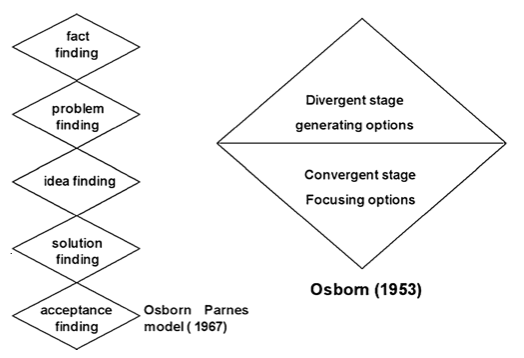
“Creative Problem Solving” (CPS) was first established in 1967 by S.J. Parnes based on the 1953 work by Alex Osborn. Osborn also developed and promoted the concept of ‘brainstorming’ as a tool to solving problems.
The Classical Five-Stage Creative Problem Solving Model. Source: Parnes, 1967
As Buijs writes, further analysis of the Osborn Parnes model brought up questions such as: is CPS truly a linear model? Does the model focus on American culture and isn’t representative of CPS in other cultures? Is the model too content oriented?
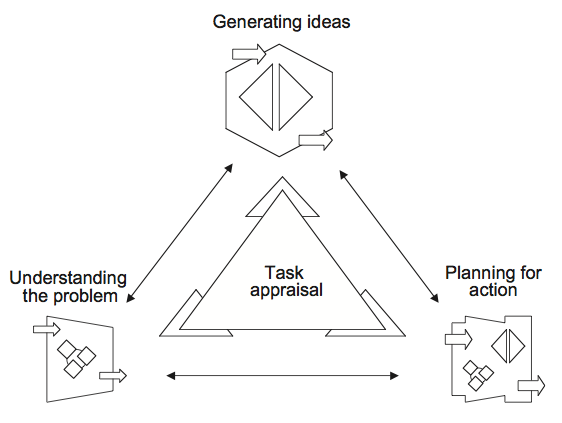
A subsequent model was created in 1993 by Isaksen and Dorval. This model moved away from the linear logic to more circular logic that leaves room for steps to be revisited.
The Ecological Creative Problem Solving Model. Source: Isakesen & Dorval, 1993
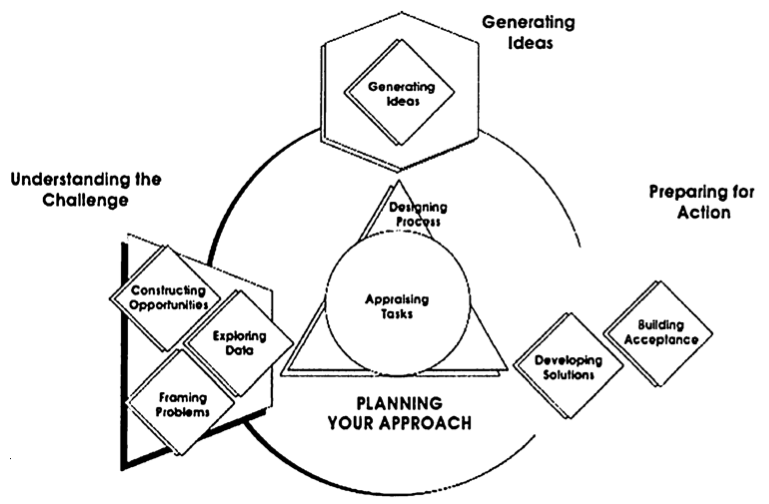
In Isakesen’s 2004 iteration of his CPS model the steps remained interdependent but the steps do not have to occur in a specific order. Isakesen also included subprocesses for each of the original steps.
Version 6.1 of the Creative Problem Solving Model. Source: Isaksen & Treffinger, 2004
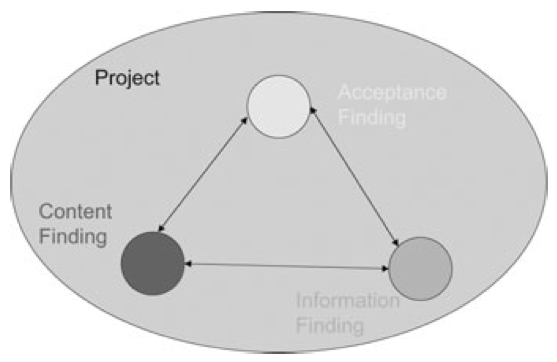
Based on their research, Buijs and team believes the Parnes Osborn CPS model does not offer a complete framework for effective problem solving. In their article, the team introduces a new Creative Problem Solving model. This model is a four-element approach described as “three parallel sub-processes: Content finding, Acceptance finding and Information finding, plus one overarching fourth process: Project management.”
Findings from the Bio-Case: Three Interdependent Processes Concurrently Managed. One Integrated Project – Content Finding, Acceptance Finding and Information Finding. Source: Buijs, 2009
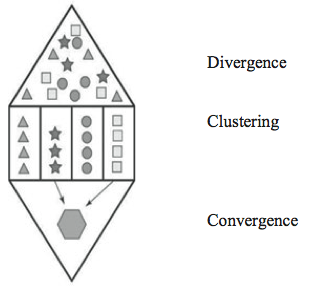
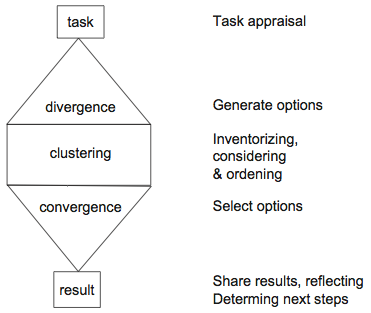
As Buijs explains, “the three parallel processes of Content finding, Acceptance finding and Information finding not only influence each other, they are also mutually dependent.” Together the results of the processes are under the umbrella of the Project Management process which acts “as an overall task appraisal for the total CPS and innovation project, as well as managing all activities in this project.” Each of the three sub-processes “start with their own specific task appraisal, followed by the divergence, clustering and convergence steps and end with a reflection on what has been achieved.” The images below illustrate the flow that occurs in each of the three processes.
The Diverging – Clustering – Converging Module
Buijs claims this model will make CPS more realistic because “in executing one (sub)- process the need for starting one of the other processes is embedded,” they are completely interdependent, not linear.
While it seems odd to create a process for promoting creativity and innovation (something that seems spontaneous and unwilling to conform to processes), this model supports the identification of an innovative solution but also encourages the implementation of the project so the great solutions found during the process are actually implemented.
I believe this is a framework that I can use to start solving my business problems. A project management tool with methods for creative problem solving. In the next week I will use this framework for CPS and see if it meets my everyday needs for finding creative solutions.
———-
Problem Solving In Practice Update: Last week I stated that when an issue was presented to me, I would take the time to understand the issue prior to developing solutions. The beginning of the week was rocky. Twice I thought too quickly and misunderstood questions asked of me. Both times the team members restated themselves and corrected the assumptions I had made by responding without fully listening to their scenarios.
Later in the week, a complicated client request was made of me, a delicate issue regarding one of the people I manage. I was careful to take time to fully understand the situation. I called the client, asked them contextual questions to know the extent of the issue and asked for their preferred solution. After the call, I took time to think of a couple solutions, discussed them with a fellow manager and decided on a solution. I felt more prepared and satisfied with the solution when I shared the response to the client because I had taken the time to fully scope the situation prior to thinking of solutions to their request. Progress!
Sources:
Buijs, J. (2007) Innovation Leaders should be Controlled Schizophrenics. Creativity and Innovation Management, 16, 203–10.
Buijs, J., Frido Smulders, and Han van der Meer (2009) Towards a More Realistic Creative Problem Solving Approach. Creativity and Innovation Management, 18, 286–98.
Isaksen, S.G. and Dorval, K.B. (1993) Expanding Views of CPS: A Synergy Methodology. In Geschka, H., Moger, S. and Rickards, T. (eds.), Creativity and Innovation, The Power of Synergy, Darmstadt, Proceedings of the 4th European Conference on Creativity and Innovation.
Isaksen, S.G. and Treffinger, D.J. (2004) Celebrating 50 years of Reflective Practice: Versions of Creative Problem Solving. Journal of Creative Behavior, 38, 75–101.
Parnes, S.J. (1967) Creative Behavior Guidebook.
Scribner, New York.
Most of us in the evening MBA program are knowledge workers. We don’t work with our hands, we don’t physically produce goods, we either create, analyze or transfer knowledge. Transferring knowledge from one person to another is the most challenging, because no two people think in the exact same way, but also the most important, because it is what drives change. Whether its giving a presentation, writing an important email, or having a tough conversation, my instinct is to fall back on my engineering background and rely on data and facts – and more often then not, doing this doesn’t inspire action.
The Harvard Business Review conducted an interview with screenwriting coach Robert McKee called “Storytelling That Moves People.” In the interview, McKee talks about how storytelling is a crucial skill for business leaders to be able to motivate their coworkers, customers and partners to navigate through business challenges. McKee describes two types of storytelling that business leaders use. The first uses conventional rhetoric and statistics, which, if successful, persuades people only on an intellectual level, which doesn’t inspire people to act. The second method of storytelling is to unite an idea with an emotion to persuade people on an emotional level and get them to act.
In the conversation, McKee describes the most difficult part of effective emotional persuasion through story-telling: discussing the struggle. We all have a tendency, especially at work, to paint a rosy picture. We want to be viewed as always succeeding, always in control, and always right. McKee argues that story without a struggle doesn’t inspire because it doesn’t connect people on an emotional level about the challenges we all face. To be a good storyteller, according to McKee, “you want to display the struggle between expectation and reality in all its nastiness.” McKee goes further to say that “the energy to live comes from the dark side…as we struggle against these negative powers, we’re forced to live more deeply, more fully.”
As an engineer working for a marketing company, the most difficult part of my job is persuading others to act while not falling back on data and statistics, and not painting a rosy picture. Even though its challenging, telling stories that include a struggle has a tendency to unite people as they think about adversity in their own jobs, which usually causes them to rally around your goals.
As McKee says in the article, being a great storyteller alone won’t make you a great leader, but it is a skill that will help make you a better leader and help you to inspire action in others. You can access the article through the Goizueta Business Library website, through the “Business Source Complete” database (search “Storytelling That Moves People”).
Source:
Fryer B. Storytelling That Moves People. Harvard Business Review [serial online]. June 2003;81(6):51-55. Available from: Business Source Complete, Ipswich, MA. Accessed July 12, 2014.
Do you ever find yourself feeling overwhelmed by an upcoming project and don’t even know where to begin? Planning the work of a team, let alone yourself, can be difficult. The planning portion sometimes seems like another project of its own. So what can we do to help manage and streamline this process?
Solution: Create a work plan.
While creating a work plan involves a few extra steps, the planning and organization involved actually makes more efficient use of your time and keeps you on track to the completion of the project. Without a proper work plan, it’s all too easy to lose focus along the way.
In Shelley Frost’s article How to Plan & Organize Work Activities and Maggie McCormick’s How to Create a Work Plan, they each break down the planning process into simple steps to help you stay organized and ensure you meet your deadlines. A summary of these steps is included below:
1) Record your goals and outcomes of the project.
2) Set an end date/deadline.
3) Break down larger tasks into smaller steps and prioritize them.
4) Schedule tasks into a daily and weekly plan. This involves creating a timeline.
5) Make sure you are regularly sending out updates and scheduling meetings to solicit feedback.
All of these steps can be tailored and applied both to a project for a whole team or individual. I’m going to try to implement this in my daily work routine to see how it affects and/or improves my organization and project outcomes. Has anyone else tried something similar and seen results?
If you’re like me, you enjoy getting book recommendations, preferably non-fiction about real people, doing real things, in real places. “Born to Run” by Christopher McDougall is just that and also has several parallels to MP concepts that we can learn from. It begins with a simple subject of running and it’s impact on injuries and transforms into a fascinating story of McDougall’s search for truth and ultimately lead’s to his conclusion that running long distances barefoot is the key to health, happiness, and longevity. From utlra-marathons to Mexican cartels, this book has a little bit of everything and is highly entertaining.
The MP concepts are evident throughout the book as McDougall starts with a simple problem, gathers information, build’s a case for his hypothesis, and then delivers it in a fun and entertaining story. Here’s a link to an overview of the book from McDougall’s website if you’re interested in learning more about it:
In the age of big data, we think data is persuasive. If we can just visualize it, harness it, and display it in a very detailed presentation, we can convince people with it. All they need to do is see our numbers, facts and figures, and they will be convinced to follow our lead. Unfortunately, this is where the human mind comes to play – as neuroscientists have discovered, most decisions are informed by emotional responses rather than by cold and hard rational thinking.
In his Wall Street Journal article on the topic, “To Persuade People, Tell Them a Story”, Dennis Nishi tells a story of Paul Smith, associate director at P&G. For many days, Mr. Smith prepared to present to P&G CEO, A.G. Lafley. However, on the day of the presentation, CEO entered the room, greeted everyone and turned his back to the screen. As Mr. Smith tells his side of the story,
“I felt like maybe I hadn’t done a very good job because he wasn’t looking at my slides like everyone else.It didn’t occur to me until later that he did that because he was more interested in what I had to say than in what my slides looked like.”
To address this issue, presenters need to connect to their audiences on an emotional level. The above mentioned Paul Smith, now a corporate trainer and an author, has a new book: “Lead With a Story: A Guide to Crafting Business Narratives That Captivate, Convince, and Inspire”. In it, he told a story of a mother’s plea to P&G executives about hardships and trade-offs she had to make for her children, and how that story convinced them to lower the price of shortening, underscoring the power of an emotional connection.
In another book mentioned in the article, “Beyond Bullet Points” by Cliff Atkinson, Mr. Atkinson tells us to move beyond facts in figures. He suggests structuring our story in three acts – starting by establishing context, following with a description of how the main character fights to resolve the conflicts, and finishing with a call to action.
Stories are important to human communication – they started long before PowerPoint presentations, and we have strong emotional connections to them. So it is important that we do not start our story with an apology or ask a permission to tell it – we should be confident enough for it to stand on its own.

 Many frameworks have been developed to assist people in solving problems creatively. These models lead to the same goal, an implementation of a solution.