Category Archives: 01-Structuring a problem

Figuring out what is truly the heart of an ambiguous problem, creating a problem statement to frame the work, doing a stakeholder analysis

Einstein’s Secret to Amazing Problem Solving

“Einstein is quoted as having said that if he had one hour to save the world he would spend fifty-five minutes defining the problem and only five minutes finding the solution.”

In the beginning of our MP journey we discussed the importance of fully understanding the problem at hand. With that we were tasked with evaluating the problem for our projects by using the idea of a problem statement summary. This tool helped guide us to clearly define the problem. I have found this tool a great resource, but always look to find even more resources to help in this department, as it is so important.

There are many times I still find it challenging to spend a lot of time on the problem at hand. It is so tempting to just dive right into a solution. Although I may know how important it is to analyze, develop, and clearly understand the problem, it is easy to jump ahead without even realizing it.

This article explains that being able to clearly define a problem is something that can be learned and developed over time.  It also explains that you may need to use a multitude of strategies or tools to help you get there.

Below are 10 strategies that you can use to help define a problem (see full article for an in depth description)

1) Rephrase the problem

2) Expose and Challenge assumptions

3) Chunk Up

4) Chunk Down

5) Find Multiple Perspectives

6) Use Effective Language Constructs

7) Make it Engaging

8) Reverse the Problem

9) Gather Facts

10) Problem-Solve your Problem Statement

Please be sure to take a look at the full article to give you a deeper understanding of the strategies listed.
https://litemind.com/problem-definition/

Tips for Leading or Attending Your Next Staff Meeting

Staff meetings. We know the drill. I think we’ve all had experience with good ones, and ones that are just plain awful.

In my experience, staff meetings have served a number of different purposes: updating others on the progress of projects, decision-making, feedback on work, getting insight from team members, problem-solving etc. The success of those meetings depended on the number of people who attended, how prepared individuals were when they went to the meeting, knowing the purpose of the meeting, and knowing the end goal of the meeting—not be confused with “what” the end goal is going to look like. For example, before you go into the meeting, you know that you want to come out with a solution to your most recent sales issues with a customer—you don’t know what that solution may be until the end of the meeting.

The following tips are from an HBR blog post about the most common mistakes that are made when trying to run a staff meeting. I’ve summarized them below:

  1. There’s no clear objective. To avoid this, make sure the objective of the meeting is clear so that “participants […] know what to expect and how to prepare.”
  2. There’s no focused agenda (despite having a clear meeting objective). This means that the agenda items are unclear (and not detailed enough). Speak to attendees beforehand to determine what exactly they want to discuss and how much time to allot to them.
  3. Not everyone in the room has a chance to speak. Ask directs questions, give “the mic” to them to speak, let the interrupters know they’ll have their time to speak = more engagement from everyone.
  4. Endless debates without a conclusion. This goes back to Mistake #2. If folks have an idea of what the agenda is beforehand, then they can come prepared with data to back potential arguments or provide useful feedback.
  5. Not reaching a consensus on an action item. Before you leave the meeting (or soon after), identify what’s supposed to be done, who is supposed to do it, and when it’s supposed to be done by.
  6. No remembering to give “kudos” to individuals. Towards the end of the meeting, make sure that you still recognize certain individuals or teams for their efforts. Help bring everyone’s efforts and hard work full circle—remind them of the overall goal.

Now I wanted to ask you…

  1. What “mistakes” have you made in a meeting?
  2. Based on your experience, what tips do you have on leading a successful meeting?
  3. What do you do just before a meeting? Right after a meeting?

Issue Trees: More Useful Than Initially Thought

In my free time (can any of us say “free time” with a straight face anymore?), I volunteer as chair of a committee for the leading professional organization of my field. A couple of weeks ago I was approached by the Board of Directors to lead a project to analyze one of the websites our organization offers as a service to members. Currently, we host and provide overall guidance for the direction of the website and pay a third-party provider to make it a reality, but many members of the board have started to wonder whether there is a better hybrid sourcing arrangement that would decrease our costs and provide a better value to our members. They believe that there are a number of problems with the website that the organization is not equipped to address or they do not want to spend the time and resources to address them. In fact their exact words were, “We could pay a consulting firm to do the analysis for us, but we were wondering if you think your committee could take it on instead.”

Because I just don’t know how to say no (and I have all that free time mentioned above), I agreed to lead the project. In a way, this assignment to focus on different aspects of MP couldn’t have come at a better time. During our last committee meeting, we began brainstorming the key problems with the website, the positive and negative outcomes, and possible solutions. I found myself relying on problem trees far more than I ever expected.

In a Project Management article at Bright Hub PM, the author describes a helpful method to brainstorm and pinpoint causes and consequences of a problem using a problem tree in a way that I haven’t tried before. He suggests dividing a board into three vertical sections in which the team lists the problems in the center column, the causes of these problems in the left column, and the consequences in the right column. The author also recommends clearly delineating between the direct causes and consequences of these problems compared to those causes and consequences that are indirectly related. Then, finally he suggests pictorially connecting the causes, problems, and consequences into a tree.

During the discussion, I often had to put forth questions in order to get the conversation moving. An article by Overseas Development Institute provides some helpful starting points, including:

–          “Which causes and consequences are getting better and which are getting worse and which are staying the same?”

–          “What are the most serious consequences? Which are of most concern?”

–          “Which causes are easiest/most difficult to address? What possible solutions or options might there be?”

–          “What decisions have we made, and what actions have we agreed?”

This method is a little different than the method my team used to create a tree in our previous semesters, but the advantages are clear. It provides a method to break the problem into manageable pieces that can be assigned to different members of the team while clearly establishing links between the various cause and effects of each problem. It will help our team prioritize both the big picture and more detailed actions that need to take place to ensure a successful project. In particular, I think creating a problem tree with a team that is international really helps all of us visualize the project. It becomes a tool that each one of us can reference at different times during the project to make sure we’re on track. Problem or issue trees are proving to be pretty useful.

A Recap on the Strategic Problem-Solving Model

Oftentimes, we can be inundated with information from work, school, and other obligations. We have covered a lot of this information in our MP course, but it is good information to look at and keep in mind when faced with trying to solve a problem in your business. McKinsey has developed a strategic problem-solving model that is specifically set in place to help MBA students build knowledge and skillsets in strategy.

Here is McKinsey’s strategic problem-solving model:

We must first start with defining the problem and determining what information is required to expand your research on that problem. This is where you “frame the problem” and then develop a hypothesis based on that problem. At this step, we develop an issue tree to break down our ideas into smaller components.

Once you develop an issue tree, you need to sort out the information into what you know and what you don’t know. Then you seek out more information on those topics that you don’t know by using fact-finding and interviewing techniques to gather information.

Here are a few tips to keep in mind when following this problem-solving model:

  • Be sure to follow facts, not intuition
  • Figure out the underlying issue before diving into the project
  • Don’t reinvent the wheel; follow the frameworks given to you
  • Look to other resources to help guide you with your research
  • Garbage in = garbage out
  • First, look at the annual report, then outliers in data as well as best practices in the industry

For more information on this strategic problem-solving model, be sure to visit http://www.webpages.uidaho.edu/~mbolin/donaldson.html.

A Methodical Approach to Problem Solving

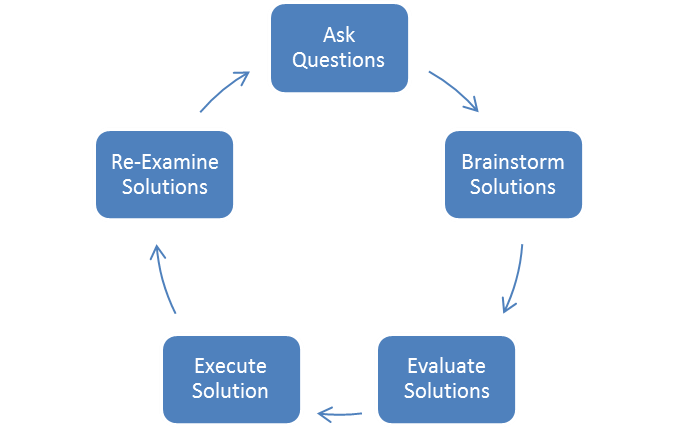
Oftentimes, we equate ‘problem solving’ with ‘critical thinking.’ However, in this case we’re referring to ‘problem solving’ as a method for finding solutions to short-term complications or setbacks. Although strong intuition is important for problem solving, you must also rely on the research and data that you encounter. What is most important is what you do with that combination of intuition and research. Here are the five steps to becoming a better problem solver:

problem-solving-process

  1. Ask a lot of questions to identify the underlying problem. Don’t jump to conclusions.
  2. Brainstorm all of the possible solutions to the problem that you identified.
  3. Evaluate the solutions that you came up with. Determine the feasibility of those ideas.
  4. Execute the most feasible idea. Good problem solvers are responsible for implementing a solution.
  5. Re-evaluate the project throughout its execution. Sometimes you will find out that you are either not solving the underlying problem or there are more problems that need to be solved.

For more information on the myths and facts of problem solving, feel free to visit the link below. This process can be applied in any business setting. By practicing these skills over-and-over, you can become a better problem solver.

http://www.entrepreneur.com/article/217516

Dig Deeper to Solve the Underlying Problems

For the sake of switching things up, I thought that I would share with you a show that really knows how to “dig deep” (pun completely intended) into the things that we often take for granted. If you have the time and are interested in finding ways to approach problems in a very different and unique way, I highly suggest you watch “Going Deep with David Rees” on National Geographic (the show just started airing a couple of weeks ago).

Why does this matter and how does it apply to this course? Sure, the topics may seem silly, ranging from learning how to tie a shoe to creating the perfect ice cube for your scotch, but the show does a great job at taking a simple concept and really understanding the components that go into it. Let me explain one of the episodes to help give you some better insight. The steps are rather detailed, but that’s really the point.

How some of us think about digging a hole:

    1. Grab a shovel.
    2. Dig.

How David Rees thinks about digging a hole:

    1. He first addresses the problem and what he’s looking to accomplish (he wants to build a “party hole”).
    2. David went to an experimental mine at the Colorado School of Mines to understand how these subject matter experts dig holes in the mine. From there, he determines that digging a hole into a rock is too dangerous for him and as a result the scope of his project changes.
    3. He goes to a soil biologist to figure out the best combination of sand, silt, and clay to dig the perfect hole (medium loom).
    4. David then goes to visit “Dr. Shovel” at Penn State University where he tests out a number of shovels to determine which ones are most efficient for him to use. From there, he learns that you actually need a couple of types of shovels for different stages of a dig.
    5. David learns that the hole he designed was actually flawed and potentially dangerous if he doesn’t “shore up the sides.” This discovery makes him adapt and change his original plans.
    6. So where does he go to learn how to shore up the sides? He goes to a golf course to learn how to keep his hole intact.
    7. From there, David goes to a cemetery to meet with a professional digger to learn better techniques on how to dig a hole. They first mark down the location and dimensions of the hole they are going to dig.
    8. He then goes to Harvard University to understand how the field mouse burrows a hole. There, he learns that these field mice dig much faster when they dig together instead of alone. As a result, David learns that he will be much more efficient if he has his friends help dig the hole with him.

Whether you’re a project manager, part of the product development team, or your manager asks you to give a presentation on the dynamics of your competition within the industry, you can use some of the analysis and problem solving skills that are utilized throughout this show. That, and you may get a good laugh out of the show as well. And you thought digging a hole was easy?

Spoiler alert. He ends up digging his party hole.

Data Visualization – Tableau

For starters, check out this video

I sometimes struggle with conveying my analysis (say, in Excel) into a presentation (say, in PowerPoint). The best way to capture the attention of your audience and to deliver an effective presentation is through data visualization. No matter how sound and detailed your analysis, if it is not communicated well to your audience then all of your hard work in performing that analysis was wasted.

Presenting data in a visual format can often be the quickest and most effective ways to convey results of your analysis and capture the attention of your audience. This can communicate a message that may have taken hours to develop in a matter of seconds if done correctly.

One of my favorite new data visualization resources that I am learning to use is called Tableau. Tableau is a software company that was founded in 2003 and does nothing other than data visualization. The company had sales of $34.2 Million in 2010 which grew to an astonishing $232.44 Million in 2013 and the company went public. It is now traded on the NYSE (ticker: DATA). It is extremely intuitive and the product looks amazing. Here is a great video that gives you an overview of the capabilities of Tableau (also linked above).

There are some really revolutionary and interesting methods to communicate data visually that are becoming more and more accepted in business and is thought by many as a way for companies to distinguish themselves among their peers. Often times my company might be similarly positioned to perform work for a given client, and I have seen that a lot of the work we have “won” has come from an effective pitch that highlights the strengths of our organization in a visually compelling manner that engages the client and shows that we can “give meaning to numbers” which is a skill that is hard to quantify.

I would be curious to get any thoughts on your experience with data visualization software and any recommendations you might have.


Other helpful data visualization links:

http://www.scientificamerican.com/article/the-data-visualization-revolution/

http://blogs.hbr.org/2014/04/the-quick-and-dirty-on-data-visualization/

http://fortune.com/2011/11/15/how-tableau-software-makes-business-data-beautiful/

Use Buckets to Solve Complex Problems

One way that you can go about organizing your thoughts and structuring a problem is by putting your thoughts into “buckets.” Here are a few examples that you can use when starting a new project:

Bucket by:

1) Time: Sort by past, present, and future. This helps show different phases of a project.

2) Function: A process flow chart will help visualize which functions are impacted by the project. This will also help give you a visual on what time(s) your function is affected.

3) Root cause: A fish-bone diagram will help show you all of the resource-related items that are grouped together. It also helps show how these root causes add value to the problem.

If you are interested in learning more about using bucketing to structure your problem, you can visit this link: http://consultantsmind.com/2013/05/16/structuring-problems-consultants-use-buckets/.

Crowdsourcing Principles

When someone thinks of the idea of “Crowdsourcing,” their first thought may be Kickstarter or some very successful micro-lending organizations.  Crowdsourcing for financial support has been hugely successful.  For example, LeVar Burton has raised more than $5MM to bring back the PBS “Reading Rainbow” program via apps. (http://bostonherald.com/entertainment/books/2014/07/levar_burton_s_kickstarter_campaign_brings_hit_pbs_show_app_to_).  On the more ridiculous side, over 1,000 people have contributed and promised to buy the Ostrich Pillow, a pillow you put your head inside to sleep in public (http://www.businessinsider.com/the-most-ridiculous-idea-to-ever-get-funded-on-kickstarter-2012-10_)

Crowdsourcing can be used within your company to solve a wide range of problems.  Often a company that has a “flat corporate structure” where opinions and contributions from all employees are valued have a better chance of innovating.  Effective digital platforms and campaigns cater to the Gen Y workforce that most companies want to attract today. Social networks and transparency are something that this generation takes for granted and they want their work-lives to enhance their digital experience.  The key to fully taking advantage of your workforce is to manage the massive amount of data that can be generated.  Having an issue “champion” to manage the process is the best way to begin.

An employee platform will also help companies identify effective opportunities for additional training, advancement and retention that will amount to huge savings, build reputation and attract the best talent in the long run.  Businesses are losing out on innovative employee contributions if they are not creating a way for employees to freely share ideas for improvement. Organizations are even presenting operating challenges to intra- multidisciplinary teams for new perspectives and problem solving.

Deciding what issues should and should not be posed to the entirety of a workforce is important.  However, some of the most complicated issues deserve the most options.  This is new space for older companies but one worth exploring.


To Make a Better Bet, Use Trial and Error

Sometimes we expect things to turn out perfectly the first time. If you do not, then you may be one of the the few. In order to (hopefully) have our ventures turn out the best as possible, we tend to brainstorm and plan ahead to circumvent any issues we may run across. However, it has been suggested in a Harvard Business Review post by Josh Sibel that we use trial and error.

Some of the greatest innovations we benefit from are offspring of trial and error. We have our ideas, notions of proper execution and their outcomes. Essentially, we plan to perfection. As eloquently stated, “perfection is often the enemy of success,” and the pursuit of such perfection sometimes proves to be a detriment. Trial and error allows one to learn from their mistakes and create a product that could have a better outcome than the one that we planned to be perfect.

We think of Apple as the bastion of perfection, but though it appears to be a well oiled perfect machine is not without the use of trial and error. Think about it, just about every iPhone release or iOS release has not been without subsequent modifications to improve the product.