The 7 Things Great Teams Execute Flawlessly

As business school students, we’ve all had a great deal of team interaction with classmates with a variety of backgrounds and experiences.  Undoubtedly, this has made for a richer experience both inside and outside of the classroom; I’ve thoroughly enjoyed this aspect of the Goizueta program.

Over the tenure of my career, I’ve had to work on teams of various sizes with various backgrounds and skill-sets.  Recently, our team at work has been growing to meet growing business needs.  As one can imagine, the larger the team, the more complex the relationships and the more difficult it is to coordinate all the moving pieces and players.

I came across this article that speaks to how best to maintain a cohesive unit.  I found the list to be not only insightful for me as part of the larger work team, but also beneficial as I lead my own growing team, especially as we prepare to be MBA professionals.

The article uses the San Antonio Spurs NBA championship to illustrate the importance of teamwork and states that, “Teamwork occurs when every member is in the zone, working in unison with one another.”  As we lead our own teams, here are seven points to keep in mind per the article:

1) Remain Poised; Don’t Panic – When things get tense try to keep calm and proactively diffuse any uneasiness.

2) Stay Focused; Execute the Plan – It is important to stay focused on the task at hand.  This is more assured when leaders assign tasks according to their team members’ interests and passions.

3) Accountability; Deliver Your Role – Be accountable to yourself and to members of your team.

4) Trust One Another; Treat Each Other Like Family –  In essence, value each member’s contribution to the team.

5) Support Diversity of Thought; Embrace Differences – This can help challenge status quo and encourage innovation.

6) Expectations are in Alignment; Adjust to Each Other’s Strengths – Strong teams  adjust to the strengths of each team member, evolving as they go.

7) Great Leadership;  Strong Culture and Identity – The team’s leader is ultimately responsible to set the tone for the team. They never stop leading, coaching and teaching. 

As a part of a fast paced work environment, I find item #7 to be the most challenging.  It’s hard to make the time with so many competing priorities.  I’m particularly curious about other’s experiences as it pertains to being “coached” at work.

http://www.forbes.com/sites/glennllopis/2014/06/20/the-7-things-great-teams-execute-flawlessly/



7 Little Tricks To Speak In Public With No Fear

No matter what, it’s hard for me to shake my nerves before a presentation. There are ways to cover them up that definitely help, but even after presenting over and over again at work, I still seem to always get a little nervous before a presentation. Lifehack has some good insight into this – these tips outline a few ways to overcome your nerves. The author admits that he still gets nervous before speaking publicly, but it’s all about finding ways to control your nerves.

His first tip is interesting – I can see how admitting your nerves could in a joking manner could break the ice. My favorite of his tips, though,  is redefining your audience. That’s something that I’ve found to be very valuable at work. Rather than viewing your audience as people critiquing you, view them as your peers or very close friends.

These tips may not work for everyone, but I think there are a few that could help overcome nerves. Good luck to everyone on your final presentations! At least in our situation, we really are all peers 🙂

10 tips on how to make slides that communicate your idea, from TED’s in-house expert

One of the skills that I chose to work on this semester was improving my presentation skills and slide design. In the past, I have been guilty of using the standard slide template, including too much text and underutilizing images. Over the course of the semester, I have been tasked with giving two presentations at work and have found ways to visually enhance my slides that have resulted in more effective presentations.

I recently came across an article on the TEDBlog that was written by Aaron Weyenberg, a UX Lead at Ted, and internally referred to as the master of slide decks. Below are 10 tips on how to make effective slides that he identified, however I have highlighted 2 tips that I found the most insightful and provided excerpts from the article.

  1. Think about your slides last. 
  2. Create a consistent look and feel. 
  3. Think about topic transitions. 
  4. With text, less is almost always more. 
  5. Use photos that enhance meaning.
  • I love using simple, punchy photos in presentations, because they help what you’re saying resonate in your audience’s mind without pulling their attention from your spoken words. Look for photos that (1) speak strongly to the concept you’re talking about and (2) aren’t compositionally complex. Your photo could be a metaphor or something more literal, but it should be clear why the audience is looking at it, and why it’s paired with what you’re saying. Below is an example of a photo I used in a deck to talk about the launch of the new TED.com. The point I was making was that a launch isn’t the end of a project—it’s the beginning of something new.

newbeginning-1

  • I found this tip to be eye-opening for me because I tend to be more literal in my presentations, so it was interesting to see how Aaron Weyenberg uses images to represent more tactical elements. For example, I am currently working on a deck outlining the new features of the upcoming relaunch of CNN.com, and instead of opening the presentation with an image from the new site, I’m planning on using a photo that represents the essence of the redesign and the impact it will have on the user.

6. Go easy on the effects and transitions.

7.  Use masking to direct attention in images.

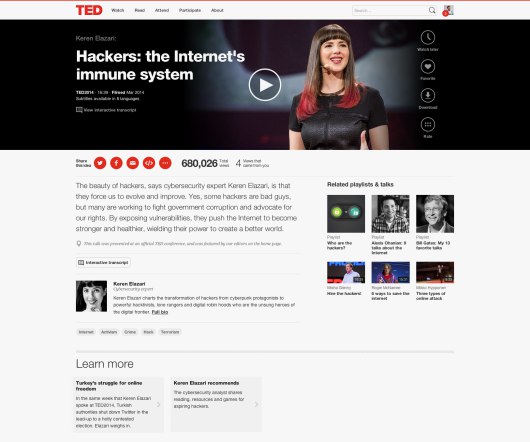
If you want to point something out in a photo, you could use a big arrow. Or you could do what I call a dupe-and-mask. I do this a lot when showing new page designs, particularly when I don’t want the audience to see the whole design until I’m finished talking about individual components of it. Here’s the original image:

mask-11

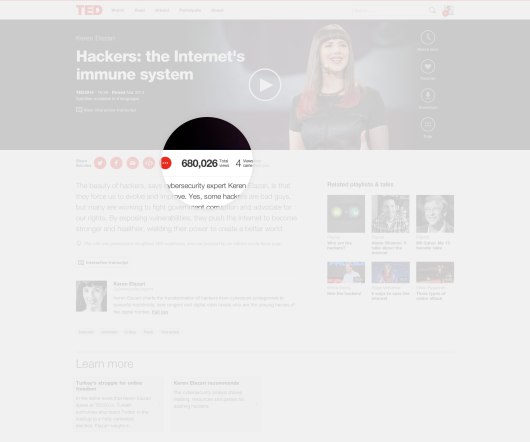
Here’s the process for masking it. (1) Set the image transparency to something less than 100. (2) Duplicate that image so there is one directly over the top of the other. (3) Set the dup’d image transparency back to 100. and (4) Follow the technique here to mask the dup’d image. You’ll end up with something that looks like this:

mask-31

  • I am often faced with this problem since my work is primarily focused on CNN.com, so many of my presentations include screenshots of our website. The tip above is a really great way to still show the site, but hone in on an area in a very interesting way.

8. Try panning large images.
9. For video, don’t use autoplay.
10. Reproduce simple charts and graphs.

Here’s the link to the full article where you can get the details on each tip.


Animations – don’t let them suck the life out of your audience!

My main goal for the summer MP session has been to improve the overall appearance of my PowerPoint slides. I learned that slide design was a weakness of mine during the first semester when I saw some of the Carlos Museum presentations that you all put together.  I was very impressed (and jealous!). I have since spent some time searching for articles on how to improve in this area, and it has been difficult to find tangible recommendations that are easy to apply. Thus, I turned to Amazon and purchased a book called slide:ology.

While I have not read the whole book yet, it has a lot of useful content, and reading it will be part of my personal action plan. I wanted to share one of many useful takeaways in this book with you, which is on animations. Human beings are innately programmed to look at things when they move (fight-or-flight instinct), but PowerPoint animations were not designed with this taken into consideration.

Every time we include animations in our presentations, our audience will turn toward the movement. Even if your animation is subtle, it will momentarily distract our audience. It is important to note that animation, while it may distract, is not always a bad thing. If we use them to help our audience process information more effectively, they can be a huge asset. This requires selecting animations wisely.

Animation should breathe life into your audience, not suck it out. Always choose animation that looks natural and alive, and movement must feel familiar. English is read from left to right, and so our eyes are much more comfortable moving left to right. Keep this in mind if you choose to have words fly-in. A descending object is sensible since we recognize the law of gravity. Although, text dropping down and bouncing all around has no meaning and can be annoying. Objects ascending appear to resist gravity, which can be perceived as illogical. The book goes into more detail on animation recommendations, but the key takeaway is not to include animations for the sake of having animations. They must be selected wisely and help the audience process information.

WP_20140805_002

It is fine to animate points, but make sure you hide them until you start discussing them.

Duarte, Nancy. Slide:ology: The Art and Science of Creating Great Presentations. Beijing: O’Reilly Media, 2008. Print.


7 Ways to Build Accountable Organizations

I believe that my organization needs to change our system of accountability and feedback.  We all walk the halls and complain to each other about how things could be better and that so-and-so department doesn’t do their job properly, but no action is ever taken!  It’s almost as if pointing out someone’s flaw is looked down upon instead of seen as trying to build a weakness into a strength.  We do have annual reviews with our managers but I don’t think any real constructive criticism takes place because we all continue to work in the same manner that we have for the past seven years since I’ve been at this company.  Don’t get me wrong- I really enjoy my company and plan to make a career there, but I think we could definitely be better.

This article I found on Forbes.com expresses some views of how to create a culture of accountability. http://www.forbes.com/sites/ccl/2012/02/28/7-ways-to-build-accountable-organizations/2/

My wife is blessed to work in an organization where feedback is constantly provided on an employees performance.  It is amazing to see how efficient her co-workers behave and how well motivated they all seem to be.  Their feedback driven culture echoes the authors sentiments about continuous improvement and constant evaluation.  I need to figure out a way to get my wife’s company’s culture into my company.

I believe that I will soon be in a position to lead one of our three sales teams so I will definitely start with what I can control.  The more challenging task will be to take our model of accountability and spread it into the other departments.  In order for our company to succeed we all need to know that the other groups are performing as well as possible.  To me it all comes down to communicating clear expectations and not being shy to question a process, especially if things could be done better.

Is your company one of constant feedback?  Do you have any interesting methods of enforcing accountability besides compensation structure?  I am all ears . . .

The Excel Trap

Vlookups, macros, formulas, cells, tables, all words used to describe a function people utilize Excel to complete a task. A quick Google search for anything related to excel will return countless forums, message boards, tutorials and other methods to learn whatever challenge you are having in the excel space. The knowledge and power to utilize Excel as a business tool is readily available. The biggest mistake people make is forgetting that Excel is just another tool, not a cure all. Sadly, once a “template” for an excel model is created, people assume the accuracy of the cells and forget to look at the data for accuracy. In many cases this problem may not cause any serious ramifications; however, as seen from Tim Worstall’s Forbes article, “Microsoft’s Excel Might be the Most Dangerous Software on the Planet”, there are situations where people were depending on excel for billion dollar deals with the wrong formula calculation.

As important as it is to understand the reasons to use excel, it is just as important to know reasons not to use excel.  Ramon Ray in “Another Reason Not To Use Excel” writes, “Many of you, I do it too, use Excel for so many things as it’s so easy to use. You just open it and begin typing. However, as your data needs expands, it’s important to use a tool that’s built for your needs. An accounting program for bookkeeping; a database for inventory; and a contact management tool for keeping track of contents. I could go on.” All too often Excel is relied upon for various business needs in places where it probably shouldn’t be there. It’s important to understand the capabilities of Excel in order to make critical decisions as to the benefit of utilizing it. Knowing the limitations can make the analysis quicker as well as ensure falling for an Excel trap.

While its users easily identify the benefits of Excel, the dangers are not so easily understood. Without having a proper spreadsheeting software, the financial institution as a whole would not be what they are today. Many of the derivate securities that are sold on the market on a daily basis are modeled using Excel or something very similar. In Worstall’s article, he mentions “That very throwing of trillions a day around the markets (and it really is trillions a day: the foreign exchange market in London alone is over $2 trillion a day) is dependent upon the existence of Excel itself.” Without excel, the models necessary to perform these transactions would be impossible; but just like anything else, if you put garbage in, you’re going to get garbage out. Unfortunately, once a model is created, it is taken as a fact, rather than as a resource to determine the right answer. This faith in Excel can lead to serious issues which is why it is important to review and refine models as more information becomes readily available. The next time you turn to Excel to solve a problem with a any sort of business model, be sure to remember that it’s just another tool in your tool belt, a powerful tool, but a tool nonetheless.

Most people give bad speeches. But most people can give good speeches

“Most people give bad speeches. But most people can give good speeches.” These are within the closing statements of Megan Mcardle’s article, “The Fine Art of a Proper Powerpoint”. Throughout our lives, we’ve had to listen to countless presentations and have probably had to give a few ourselves. Among these, there are those that captured our attention while others have lulled us to sleep with no recollection of what the subject of the presentation was. There are plenty of resources online to help guide what a proper presentation should look like, but I don’t intend to bore you with that. Miss Mcardle makes several good points in her article, which I will touch on, but I’ll also describe what experience has taught works best.

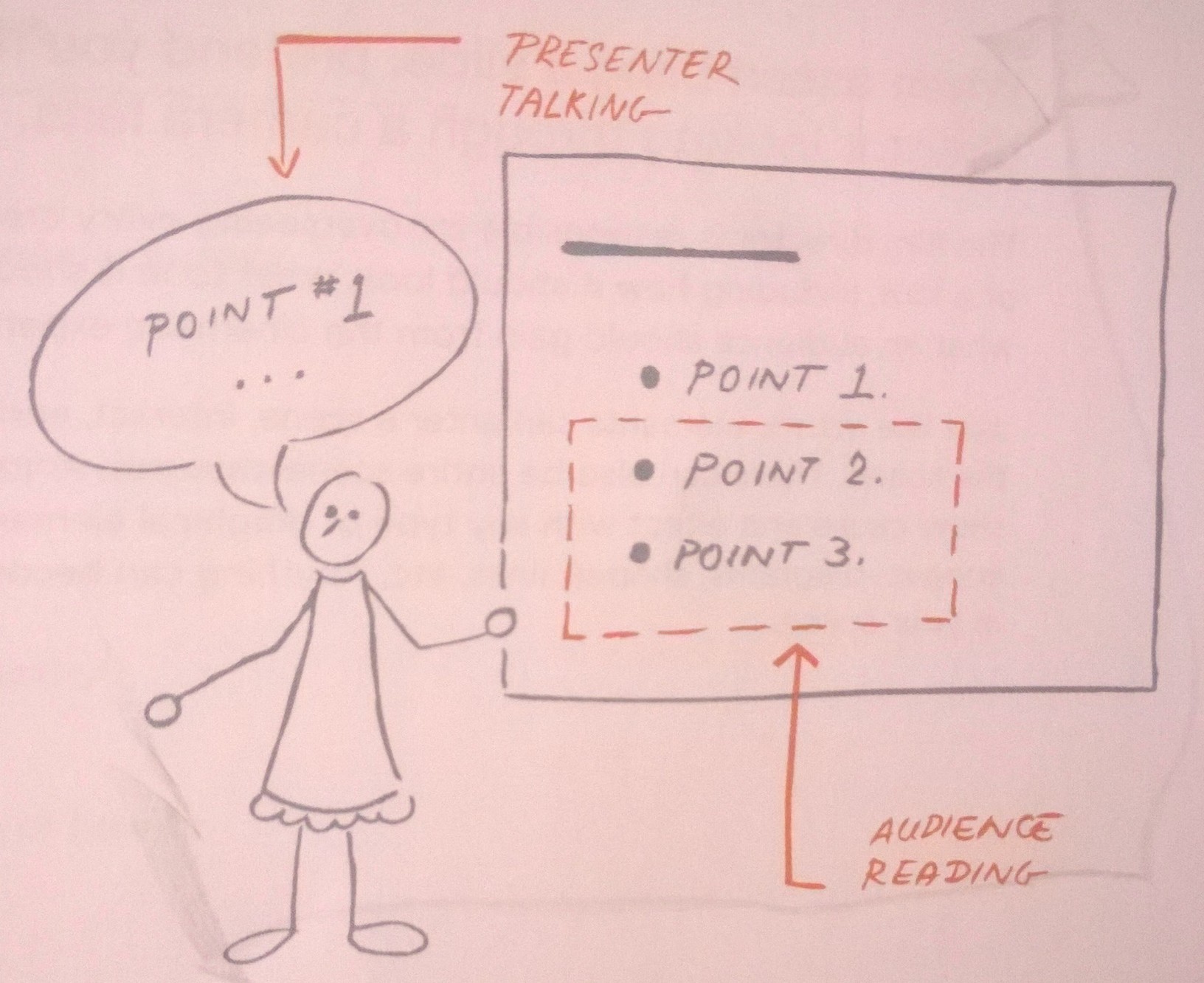
The number one mistake that most people can identify as a guaranteed sleeper presentation is when the presenter puts all the material on the slides and then proceeds to read what the audience is looking at. As Ms. Mcardle puts it, “Listening to people read from their notes or their slides is considerably less interesting than listening to a five-year-old read from “My Pet Goat”–at least the five-year old is really trying.” As a presenter, it’s important to remember that you are meant to be the subject matter expert on what you’re presenting, otherwise, why are you the presenter? Being the most knowledgeable on a topic doesn’t come easy, but that’s why you’re given time in advance to prepare (for the most part anyway). In your slide craft, it’s important to know what information the audience needs to visually see versus what they should expect to hear from you. With that in mind, you can begin to prepare your slides.

Avoiding the “reading” method of presentation will help reduce the overall word count that is placed on each slide. It forces you to take on the role of the educator with the material, rather than the messenger. Slide craft focuses on ensuring enough material, mixed with white space, appropriate graphics and visuals, and proper takeaways are present from each slide. Slides with a purpose are the only ones that should fill a presentation. Crafting the look of the slides is often the easiest part, the content chosen needs to be meticulously determined by understanding who the audience is and catering the content specifically for their position. Not all gaps have to be filled within the slide, there’s a Q&A session for a reason. No presentation, however, can ever account for content not prepared for; therefore, the most important part of the presentation is the pre-work of the material you’re presenting on (recall the Delta presentations, without the work we put in before, we would’ve had no material to present).

At this point, the slides are mostly ready and the delivery practice begins. When delivering, remember that you know the content of the presentation and you’re explaining to, expanding on, and educating with the material to the audience. This requires audience engagement. The #1 way to be sure that they’re engaged is to look at them. Eye contact helps not only engage the audience, but it also lets you know when you’re beginning to lose the audience. This awareness helps you change your presentation on the fly. Since you’re familiar with the material, you can determine if you need to expand further on the slide, move on, or ask a pertinent question to determine overall audience engagement. Knowing the material and being passionate about what you’re delivering help this type of presentation style. If you are excited about your subject, the audience will feed off this energy and remain engaged more easily. There are many more nuances to presentation delivery, and the best way to improve is to just give more presentations, which will help you find the style that works best for you. Plenty of resources are available online but if you can keep the presentation clean and focus on the audience, you’re well on your way. Besides, “The slides, after all, have probably already heard this talk before.”


Sink or Swim – Managing my home renovation

At the beginning of the semester, I decided to work on my project management skills.  I had no idea that I would be managing the most important project of my life.

After this summer semester started, I decided to purchase a home.  While looking at the houses, I found that houses that were move-in ready were 25-50% more expensive than ones that were a similar size in the same neighborhood.  Being a spend-thrift, I convinced myself that it makes more financial sense to buy a house that has not had any updates since it was built (in the early 70’s) and to do all the renovations that I want done.  In the end, I believe that I can have the exact house I want AND not have to pay the markup of the ready-to-go houses.  I had priced out the major materials such as sheetrock, lighting fixtures, bathroom fixtures, kitchen cabinets and appliances.  The total cost, with reasonable labor, for everything appeared to be a fraction of the difference between the cost of my home and the comparable homes with upgrades.  So I bought a fixer upper and the past couple months of my life have been the busiest that I have ever been.

Surprisingly, I do not have very much free time between school and work.  For some odd reason, I overlooked this fact with the excitement to have a house of my own.   This fact presented itself again as soon as I closed.  I realized that my apartment lease ends at the beginning of November and that I want to be ready to move into my new house by then.  This left me with 4 months to do a major remodel that involved demolition of all the existing sheetrock (walls and ceilings), removing floors (tile/wood/and carpet), removing/moving/adding 9 walls,  completely redoing all of the plumbing and electrical, adding ethernet and speaker cabling, rerouting the HVAC ducts, adding new hardwoods and tile, new kitchen cabinets and appliances, painting, trim, door handles, lighting fixtures, and on and on.  The number of decisions that need to be made are almost limitless.

I went looking for a general contractor and found that the prices that I would have to pay for someone to manage and do the entire project for me would be more than if I had just bought a move-in ready house to begin with.  And that I have to pay the contractor cash instead of being able to take a loan for that amount.  I realized that project management had a steep cost.  I had already bought the house and my only option was that I would just have to do it myself (in my huge amount of free time).

This is doing project management to the maximum extent.  I have taken on a project with my entire life savings at stake.  I can not afford delays in this project.  I can not afford for top dollar electricians and laborers.  Yet, I do not have the time to do the majority of this work myself.

I have drawn the floorplan, I have studied the codes, I have navigated the permitting and inspection process, I have done significant amounts of demolition (in an effort to save money), I have taken bids from independent contractors for electrical, HVAC, plumbing, framing, sheetrock, and flooring (but still have so much more to do).  I have created a timeline of activities and am managing progress of each contractor so that there is as little dead time in between.

I am learning the importance of communication and documentation.  Every instruction needs to be clear and every visit needs to be scheduled and confirmed (sometimes multiple times).  Every sub project has its own supplies and materials list and its own budget.  Recently, I have started to dabble into trying to use MS Project to build a Gantt chart as Excel is a bit difficult when I need to add a previously unplanned task in the middle.

So, I said that I would work on my project management skills.  This is about as big of a project as I am ever going to get.

-Fawad

European businesses forget that the United States is not united at all

I know this article is not really related to any of the categories but I read it and thought it is a great view of what I have experienced in my first 2 years living in the US (more personally though, and not business related)

http://www.telegraph.co.uk/finance/economics/10260066/European-businesses-forget-that-the-United-States-is-not-united-at-all.html

The article basically shows that lots of Europeans still think that the USA is one big country where everything works in a similar fashion everywhere. 

However it is rather the opposite! This might also be a reason the why so many european companies struggle to crack the US , because they do not know this.  

Lots of british supermarket brands like Tesco and Marks& Spencer tried to enter the US market, however none of them was successful.

If european businesses would keep in mind the huge regional differences in the USA and their customer, a successful market entry would be possibly much easier.


What Not To Do

What Not To Do (When Giving a Presentation):

While most of us know what we “should” be doing when it comes to giving presentations, we oftentimes forget what we should NOT be doing. I have realized over time that what we should vs. should not do are not inherently mutually exclusive. You can be doing everything that you are “supposed to” (i.e. following best practices), but simultaneously be making common errors that can limit the effectiveness of your delivery.

I’m as guilty as anyone when it comes to checking the boxes for everything that a strong presentation should have, but I’ve started to realize that by diagnosing errors that I am more inclined to make, many of the recommended strategies subsequently fall in line naturally.

To frame this as a metaphor, I’m talking about targeting the disease, not making the anecdote stronger. I’ve found that this starts with getting back to the basics and building from there. So, what are some of the more common pitfalls in presentation delivery? After vetting several resources I’ve consolidated a list of quick anecdotes that I have found to be helpful to keep in mind:

  • Avoid reliance on slides. Slides are there to compliment your presentation and provide a framework, not the other way around.
  • Overload: Less is more. Too much talking and/or too much text will easily disinterest any audience, no matter how rich the content.
  • Avoid Apologies: If something goes wrong, there is a typo, you say something incorrectly, etc… JUST GO WITH IT. Odds are that no one else noticed and by drawing attention to it you are just calling out yourself (and your credibility).
  • Avoid filler words: This is public speaking 101, it sounds easy and we’ve heard it thousands of times, but it is absolutely critical. Unfilled airtime between sentences and ideas is okay. Specifically avoid “um”, “so”, “right”, and “you know” are very common and very distracting!
  • Going over your allotted time: Once you start to go long you begin to lose your audience. And once you even begin to lose your audience, it’s too late. This can cause the audience to miss your “big finish” and really tear down everything you’ve worked so hard to build.

While there are many more, these are just some of the most common problems that can hold you back from delivering the most effective presentation possible. We never get to a point where we are too advanced to worry about the basics. While one of these points are anything that you haven’t heard before, hopefully you will find some of these to be helpful reminders.


Helpful Resources:
http://www.inc.com/eric-v-holtzclaw/big-presentation-5-rookie-mistakes-to-avoid.html
https://www.youtube.com/watch?v=gNG0etmnwuk
http://blogs.hbr.org/2012/12/avoid-these-five-mistakes-in-y/


MEMBA learning community, Fall 2016- Spring 2017