Life is a Negotiation, Come out on top

One of the most valuable lessons I have learned in my career is the power of being an effective negotiator.  Some people will say that their job doesn’t entail negotiations but I would argue every job involves negotiations.  Whether you are trying to make a sales pitch with a formal presentation, doing a price negotiation with a supplier, trying to get your cross functional team to use your project idea, or even trying to convince your boss you need a raise.  If you talk to anyone at work at some point you are doing some sort of negotiation.

Being persuasive is another way to view negotiations.  If you are trying to persuade someone of your point of view then you are doing a negotiation.  The quicker you realize you are negotiating with someone the quicker you can begin to use some of these tips of how to be more persuasive:

http://www.lifehack.org/articles/communication/how-persuasive-and-get-what-you-want-easily.html

For the basis of MP we are primarily talking about how to be more persuasive during presentations.  Every time we present in MP we are trying to persuade the audience to think our solution to the problem is the best solution out there.  Before you put together any presentation you should ask yourself “What do I want from the audience?” and then tailor your presentation to achieve that.

As I mentioned above I like to look at being persuasive as an important skill set to being successful in business.  Being an effective negotiator can get you on the projects you want, have the processes you want implemented, working with the people you want, and ultimately getting you that job and promotion you covet.

Some people don’t like negotiating, initially myself included, but the more you practice it and use these techniques the more natural it will become.  Before you know it you will be negotiating with people without even realizing it.

What have you negotiated for lately?

Consumer Analytics and the Future of Shopping

These days the concept of “Big Data” is becoming more and more popular.  Companies are using Big Data to get a better understanding of who their consumer is and what they value.  Some companies have even hired employees just to mine data.

Two examples I have been a part of in my career are Home Depot dotcom and bubba brands.

While I worked at Home Depot dotcom they had a full team dedicated to understanding how an online consumer shops, what their product preferences are, and how to best get them to the pages they are interested in.  Since we were operating in an online environment the data was real time and easy to obtain.  All of these analytics and upgrades have Home Depot dotcom positioned to be a top 10 online retailer by the end of 2014.

At bubba brands we do 95% of our sales through big box retailers so it is not as easy to become intimate with our consumer.  In order to get closer to our consumer we have focus groups once a month throughout the country to understand what women look for when they purchase drinkware.  We combine this qualitative data with the quantitative data to make real time decisions on product assortment and future product launches.  This analysis has positioned us as the number one drinkware vendor in Wal-Mart.

The below article provides information on consumer analytics and how it is going to shape the market place in the future.

http://timoelliott.com/blog/2014/02/the-future-of-customer-analytics.html


How is your company using big data to better reach your end consumer?


Every Spreadsheet Has An Error

If your job is anything like mine, you’ve had to work on a massive data dump, sorting and manipulating to find “a story.” The size of the data files can sometimes be intimidating and there sometimes is that concern in the back of your mind that some formula or reference within your Excel workbook went rogue.

As we strive to be more proficient in our Excel skills and more efficient in our tasks, coming across a headline such as “Every Spreadsheet Has an Error” can certainly sound alarming! However, as I read the article in greater depth, I found the points to serve as good guidelines to help check my work.
http://www.forbes.com/sites/billconerly/2013/04/25/every-spreadsheet-has-an-error-7-lessons-motivated-by-reinhart-and-rogoff/
Some of the tips suggested in the link are:

1) Use assumption variables – Similar to what we learned in Decision Analysis class, create a section within your workbook with all your assumption variables. Create links within the workbook to these assumptions. This will ensure that when you have to change your assumptions in the future you will not have to search all your data for every occurrence that may be affected.

2) Link, don’t copy – Create links to raw data so that you can go back and check your manipulated data against the original document.

3) Create double-check formulas – “If, then” and “true, false” statements are great for checking your work!

4) Format to Tell Differences – Conditional formatting helps to highlight differences in the data. They also help to identify trends and patterns in your data. I’m a big fan of using colors when doing conditional formatting.

5) Graph Your Data – When possible, graph your data. A line chart for instance will give you a quick visual to not only spot any irregularities in your data, but also to help find “the story.”

6) Document – Create notes of the steps or sources that you used to create your end product. This habit can save a ton of time when you have to do an update. Notes are also helpful for others who may have to replicate your report. We have a saying at my workplace, “a detailed source line is not for the client, it’s for us!”

7) Be Suspicious – Check your work. See if you can find an error.

Hopefully, by following some of these tips, you found all of your errors!

Steve Jobs and the Value of Deadlines: Real Artists Ship!

jobs-real-artists-ship

I recently listened to Walter Isaacson’s book Steve Jobs, in which the reader (or in my case the listener) is treated to a behind the scenes view of the rise of Apple, Inc. and the role played by its founder.  One of the most memorable moments in the book comes when only a week before the scheduled launch of the Macintosh a  small team of engineers and designers approaches Jobs to let him know they won’t be able to make the deadline.  In an effort to rally and cajole his team to meet the deadline, he exclaims, “Real Artists Ship!”

The concept was that it doesn’t matter if you’re the most creative person in the world if you can’t deliver on that creativity.  There are no shortages of accounts in Isaacon’s book that suggest Jobs was a lover of creative thinking and artistic design –some might say he held that in higher regard than anything else –but this particular instance indicates his clear understanding on the value of delivering the goods –on setting a deadline and sticking to it, no matter what.

All too often in life (with the exception of legal filing deadlines during my years as a litigator) I have been soft on deadlines.  Whether it’s with myself or with people who are reporting to me.  I adopt an “okay, we can push it back one more week,” mentality, believing, like Jobs’s engineers that one more read through of a contract or one more week spent practicing tennis before a big match is going to make a substantive difference.  Jobs’s point, however, was that it does not matter if you have written the perfect contract or crafted the perfect forehand volley if you can’t get out there and share it with the world.  The reason “real artists ship,” is that you only know about the artists that actually sat down and delivered their work –the others, well, they weren’t artists, they were just dreamers.   So set your deadlines for yourself and your team and stick to them!  Real Artists Ship!

If you’d like to read a firsthand account of what it was like trying to meet the Mac software deadline, you can do so here, where Andy Hertzfeld shares his perspective on running under the gun of Steve Jobs.


Tricks to Giving Phone Presentations

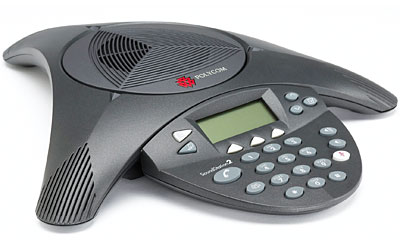
conference-phone

Being a great presenter is a great skill to have in front of a live audience.  However, the reality of large national and international corporations is that creating a live in-person audience is often impractical and costly. Technology has been making speaking to a physically absent audience more realistic with teleconferencing, video conferencing, and the like. However, an effective presenter also needs to have a great presence over the phone and through video conferencing equipment. The skill set is obviously similar, but here are some tips for nailing that presentation on your next conference call or video conference (which I have filtered and summarized below).

  • Check in to solicit comments or verbal acknowledgement that the audience is still with you. You may have lost the audience 10 minutes ago, and you don’t even know it.
  • Master the silence. Silence can be okay as long as it is not too long. Over the phone, it can still be used for dramatic effect.
  • Go around the horn to check in on different audience members to see that they are still following along. For instance, call someone out who you know should be listening, i.e. “Are there any questions from the Atlanta office?”
  • Don’t over answer questions. It is possible that a large portion of the audience already knows the answer and has decided to tune you out because you spent 5 minutes answering the question from the new guy who needs individual attention later.
  • Send out visuals beforehand. The addendum to the call should be sent in advance of the call to all attendees. Don’t forget page numbers and reference them in your call so the audience knows where you are.
  • Don’t read off the slides. Unlike a live presentation, the audience already has your slide deck and has probably looked ahead because you were supposed to send them the slides and exhibits before the call. Add color. Make it lively. Add value to the listeners. Keep the audience awake with a funny anecdote or an example that they couldn’t find using Google.
  • Remember to practice. Depending on the format, you may be tempted to write down what you are going to say and read it on the call. The audience can tell when something is scripted. Instead of sounding polished, you sound like an actor reading over his lines in a read-through. This is not a dress rehearsal – this is the real thing!

BIG cell phone

Inspiration:

http://blog.teamthinklabs.com/index.php/2011/12/21/7-tips-for-presenting-over-the-phone/

http://www.threetraining.com/three-tricks-to-powerful-phone-presenting/

http://brainzooming.com/7-tips-to-improve-conference-call-presentations/952/

Finding your dream job

Over the course of this semester, I have been reflecting on what I want my next adventure to be. I have enjoyed my time with The Carter Center, had many amazing opportunities (including traveling to China, Ethiopia and Ghana) and honed a lot of skills (developing a strategy in a new field for a 20-year old program, designing and executing events, coordinating travel logistics around the globe, researching and writing…a lot, et cetera, et cetera). But I think my time to move on is nigh. In terms of functional skill set, I think I have learned everything that I will learn here. More time at TCC will mean further honing these skills, and continuing to learn more about China. But, those are both things that I can do elsewhere, too.

I have looked through a couple resources for job-seekers that want a clearer way to evaluate multiple paths one can take. Thus far, I have found Forbes’ ‘ideal job algorithm’ to be the best balance of being comprehensive, and straight forward. http://www.forbes.com/sites/brettnelson/2013/02/28/how-to-find-your-dream-job/

The algorithm uses the following parameters to guide you in your evaluation of your next step:

1. Compensation

2. Satisfaction

3. Opportunity

4. Commitment

5. Culture

6. Health

7. Location

8. Teamwork

9. Number of hats

10. Business or retail

And the beauty of this algorithm is that you can adjust the weights depending on what is more valuable to you. Naturally, you can also remove some variables if they are of no importance to you at all, and you can add variables that the author has left out. For example, are you in a phase of your life where location is really important (you just had child, and want to be around your support network)? Do you have some debt (….student loans, perhaps?).

When I shared this with others, they commented that there is no such thing as a “dream job”. Or maybe there is, but searching for jobs is so reliant on timing (mutual availability) and other factors that it is unlikely that we will ever meet up with our dream job. What do you think? I guess this is the same thinking that people can apply to the chances of finding “the one.”

Others have said that we cannot hope for/aim for dream jobs, but should think in terms of “dream careers.” This approach would offer greater feasibility and flexibility. While it may be difficult for each job you have to be “a dreamy job,” certainly there are some valuable take-aways from it that you can use to create a larger dream.

I very well may be too idealistic–do you think it is unreasonable for your job to bring you some sort of higher satisfaction? I have heard that critique of our generation–that we expect our jobs to provide us with some sort of higher purpose, and we are often disappointed when it does not live up to that. Instead, it provides a place for us to go and be busy every day, and a way to pay the bills.

This is a very broad question, perhaps the broadest question you can ask about work life/careers in general–what is the ultimate goal? I’d be happy to hear your two cents.

Alternatives to PowerPoint

PowerPoint Alternatives: Will PowerPoint Ever be Obsolete?

Will PowerPoint ever be replaced?  It has become commonly accepted in the business world that ‘PowerPoint’ is synonymous with ‘Presentation’. However, when is the last time that you (or me, or anyone for that matter) questioned the validity of that accepted standard, or even gave fleeting consideration to using a different presentation platform or software program?

So, that leads to the question of whether or not PowerPoint will ever become obsolete, outdated, or replaced by something newer and shinier. In researching thoughts on this topic by folks smarter than myself (such as Jeff Bezos, CEO of Amazon, in this article), I discovered a few things.

First of all, there are already many of alternatives to PowerPoint, and while they might not be household names, they can arguably match the functionality of PowerPoint, and perhaps even be more targeted towards your audience depending on the nature of the presentation. Some of the more popular alternatives to PowerPoint include Apple’s Keynote (which Steve Jobs popularized by using when rolling out new products), Google docs (free, ‘quick and dirty”), SlideRocket (great for folks in a sales environment), and perhaps most notably, Prezi (Intuitive, sophisticated, puts ‘slides in motion’, great for storytelling).

I am personally considering giving Prezi a try based on the positive reviews and feedback that I have read and would love to hear from anyone in our class who has tried the software first-hand. It does seem that one day PowerPoint might be replaced as the gold standard for delivering presentations, but that day is likely not going to come anytime soon, and we are likely better off improving our delivery method rather than changing the platform all-together.

So, what are your thoughts??


Articles for Reference:

http://www.forbes.com/sites/carminegallo/2012/09/07/jeff-bezos-and-the-end-of-powerpoint-as-we-know-it/

http://lifehacker.com/5888189/five-best-powerpoint-alternatives

http://www.customshow.com/best-powerpoint-alternatives-presentation-programs/

http://www.powtoon.com/blog/10-best-powerpoint-alternatives/


Art of Persuasion: Tell a story

Persuasion: /pər-ˈswā-zhən/ The act of causing people to do or believe something.

Persuasion is the centerpiece of any  business activity. Customers must be convinced to buy your company’s products or services, employees and colleagues to go along with a new strategic plan or reorganization, investors to buy (or not to sell) your stock, and partners to sign the next deal.  Persuasion, despite being so critically important, history has shown that  many leaders, business executives  struggle to communicate , too often, the message  gets lost in the accoutrements of companyspeak: PowerPoint slides, dry memos, and hyperbolic missives from the corporate communications department.

Robert McKee , leading screenwriting instructor in his recent article on Harvard business review  suggests that   speakers can engage listeners on a whole new level if they toss their PowerPoint slides and learn to tell good stories instead. According to Mckee, there are two ways to persuade people. First, Using conventional Rhetoric  and second, through Uniting an Idea with emotion.Out of two the latter being the most powerful, and is best accomplished by telling a story.

Storytelling That Moves People


Powerpoint: Its not just what you say….

Read an interesting article the other day when putting together my MP presentation: Check it out.

It brings up some very interesting points about what makes a good power point presentation – specifically good slide craft.   By focusing on several key cognitive principles (having to do with mental processes and how we intake and process information), the article  reduces concept to execution by outlining several ways to obey the principles when creating slides.

My personal favorites have to do with using visual queues to trigger the brain to ingest information in specific ways.  When discussing ranked information, by maintaining color schemes and orderings across slides, it is possible to increase memory retention in the audience.  Or by making important information visible different from the other contents of the slide, it signals the brain that the visually different information is potentially more important that the rest on the slide.

I highly recommend that you run through the first 6 pages at least and compare the cognitive corollaries listed with slides you’ve done or seen in the past.

Pharmacist with Advanced Excel Skills, an Oxymoron?

I have now come to the conclusion that a pharmacist with advanced Excel skills is an oxymoron.

To prove this I did an advanced linked in search a couple of months ago with the key words “pharmacist” and “excel”. I was surprised when I got a lot more hits than I expected. I started to panic. However, when I started going through the profiles, I realized that people were describing how they excelled at say patient care or customer service etc. rather than at MS Excel.  While this brought a sigh of relief that I wasn’t alone in the boat of pharmacists bereft of excel knowledge, it made me also realize the huge opportunity that existed for me.

My journey into the world of excel has been through a variety or resources, but I have found wallstreetprep.com particularly helpful.

While I’m still a work-in-progress, I am encouraged by what I am able to do so far and wish to send that encouragement on to my other colleagues, who by their nature of work never have to touch a spreadsheet. It is doable. All it takes is a couple of minutes a day consistently.

MEMBA learning community, Fall 2016- Spring 2017